
Package database (unnamed puplet 1.1)
Usefull to developers and people who wants to remove apps or libs included in this puplet (petget/new2dir format). It only has file lists for new packages in up-1.1
Unnamed puplet 1.1 (puppy411 kernel-2.6.28.5 Xorg-7.4 LXDE)
- Attachments
-
- unnamedpuplet-pkg-db-1.1.tar.bz2
- Package database
- (6.94 KiB) Downloaded 647 times
[url=http://www.puppylinux.com][img]http://i.imgur.com/M4OyHe1.gif[/img][/url]

Kernel 2.6.28.5 - Check
SMP kernel - Check
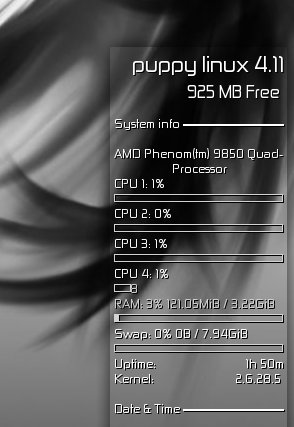
Conky catches all 4 cores - Check
Detects ati radeon 3850 and installs xorg radeon driver - Check
xorg radeon driver works correctly - Check
DRI enabled - Check
composite works correctly - Check
AFAIK this is the only puplet to get all checks
I am using Patriots enhanced jwm with xcompmgr/kcompmgr
http://www.murga-linux.com/puppy/viewtopic.php?t=39162
SMP kernel - Check
Conky catches all 4 cores - Check
Detects ati radeon 3850 and installs xorg radeon driver - Check
xorg radeon driver works correctly - Check
DRI enabled - Check
composite works correctly - Check
AFAIK this is the only puplet to get all checks
I am using Patriots enhanced jwm with xcompmgr/kcompmgr
http://www.murga-linux.com/puppy/viewtopic.php?t=39162
hey Wow, It seems almost ungrateful to point out a tiny glitch, when everything that really matters is working so well, but just in case you have some free time the bar for core 4 seems abbreviated somehow. It works inside the bar, that is, if it says 33% then 33% of the tiny bar is filled. You mentioned that you had written a script to get the 4 cores so I thought you might want to see this.
-
divisionmd

- Posts: 606
- Joined: Sat 14 Jul 2007, 20:42
Hello all,
- I tried an installation to harddisk and noticed that the system is in readonly mode.
At bootup i get this:
.......................................
/etc/rc.d/rc.sysinit: line30: /etc/rc.d/PUPSTATE: Read-only filesystem
.......................................
- Any change i do when i have logged in - changed the background picture or anything else for example is lost after i reboot.
- Can i change this to write mode ?

Best regards,
Johan
- I tried an installation to harddisk and noticed that the system is in readonly mode.
At bootup i get this:
.......................................
/etc/rc.d/rc.sysinit: line30: /etc/rc.d/PUPSTATE: Read-only filesystem
.......................................
- Any change i do when i have logged in - changed the background picture or anything else for example is lost after i reboot.
- Can i change this to write mode ?
Best regards,
Johan

-
divisionmd
- Posts: 606
- Joined: Sat 14 Jul 2007, 20:42
menu.lst
Hello Mark,
Here is menu.lst file:
.................................................
# GRUB configuration file '/boot/grub/menu.lst'.
# generated by 'grubconfig'. Thu Mar 26 13:14:15 2009
#
# The backup copy of the MBR for drive '/dev/sda' is
# here '/boot/grub/mbr.sda.9494'. You can restore it like this.
# dd if=/boot/grub/mbr.sda.9494 of=/dev/sda bs=512 count=1
#
# Start GRUB global section
#timeout 30
color light-gray/blue black/light-gray
# End GRUB global section
# Linux bootable partition config begins
title Linux (on /dev/sda1)
root (hd0,0)
kernel /boot/vmlinuz root=/dev/sda1 ro vga=normal
# Linux bootable partition config ends
# Linux bootable partition config begins
title Linux (on /dev/sda2)
root (hd0,1)
kernel /boot/vmlinuz root=/dev/sda2 ro vga=normal
# Linux bootable partition config ends
title Install GRUB to floppy disk (on /dev/fd0)
pause Insert a formatted floppy disk and press enter.
root (hd0,0)
setup (fd0)
pause Press enter to continue.
title Install GRUB to Linux partition (on /dev/sda1)
root (hd0,0)
setup (hd0,0)
pause Press enter to continue.
title - For help press 'c', then type: 'help'
root (hd0)
title - For usage examples, type: 'cat /boot/grub/usage.txt'
root (hd0)
.................................................
Best regards,
Johan
Here is menu.lst file:
.................................................
# GRUB configuration file '/boot/grub/menu.lst'.
# generated by 'grubconfig'. Thu Mar 26 13:14:15 2009
#
# The backup copy of the MBR for drive '/dev/sda' is
# here '/boot/grub/mbr.sda.9494'. You can restore it like this.
# dd if=/boot/grub/mbr.sda.9494 of=/dev/sda bs=512 count=1
#
# Start GRUB global section
#timeout 30
color light-gray/blue black/light-gray
# End GRUB global section
# Linux bootable partition config begins
title Linux (on /dev/sda1)
root (hd0,0)
kernel /boot/vmlinuz root=/dev/sda1 ro vga=normal
# Linux bootable partition config ends
# Linux bootable partition config begins
title Linux (on /dev/sda2)
root (hd0,1)
kernel /boot/vmlinuz root=/dev/sda2 ro vga=normal
# Linux bootable partition config ends
title Install GRUB to floppy disk (on /dev/fd0)
pause Insert a formatted floppy disk and press enter.
root (hd0,0)
setup (fd0)
pause Press enter to continue.
title Install GRUB to Linux partition (on /dev/sda1)
root (hd0,0)
setup (hd0,0)
pause Press enter to continue.
title - For help press 'c', then type: 'help'
root (hd0)
title - For usage examples, type: 'cat /boot/grub/usage.txt'
root (hd0)
.................................................
Best regards,
Johan
Re: menu.lst
divisionmd wrote:Hello Mark,
Here is menu.lst file:
kernel /boot/vmlinuz root=/dev/sda1 ro vga=normal
# Linux bootable partition config ends
# Linux bootable partition config begins
title Linux (on /dev/sda2)
root (hd0,1)
kernel /boot/vmlinuz root=/dev/sda2 ro vga=normal
Best regards,
Johan
Take out the "ro" ------ read only
-
divisionmd
- Posts: 606
- Joined: Sat 14 Jul 2007, 20:42
Hello,
- I made that chaneg to the menu.lst file however it is still in read only mode.
Getting this when booting:
.......................................
/etc/rc.d/rc.sysinit: line30: /etc/rc.d/PUPSTATE: Read-only filesystem
.......................................
- It must be something with that above? that is causing the system to boot in readonly mode.
Thanks for help,
Best regards,
Johan
- I made that chaneg to the menu.lst file however it is still in read only mode.
Getting this when booting:
.......................................
/etc/rc.d/rc.sysinit: line30: /etc/rc.d/PUPSTATE: Read-only filesystem
.......................................
- It must be something with that above? that is causing the system to boot in readonly mode.
Thanks for help,
Best regards,
Johan
-
divisionmd
- Posts: 606
- Joined: Sat 14 Jul 2007, 20:42
Hello
Thanks MU,
- Seems to work now that message during bootup is now gone - excellent!
- However when changing settings to conky these settings are not saved after reboot?
- Also that question at bootup "keep it simple" or "shiny thing" is that something you can modify ?
So it saves the choice i make - so i dont need to make that choice at every bootup.
Thanks alot,
best regards,
Johan
- Seems to work now that message during bootup is now gone - excellent!
- However when changing settings to conky these settings are not saved after reboot?
- Also that question at bootup "keep it simple" or "shiny thing" is that something you can modify ?
So it saves the choice i make - so i dont need to make that choice at every bootup.
Thanks alot,
best regards,
Johan
Re: Hello
how do you cange it?divisionmd wrote:- However when changing settings to conky these settings are not saved after reboot?
Johan
I think you must edit /etc/conky/conky.conf
Is that, what you did?
Mark
[url=http://murga-linux.com/puppy/viewtopic.php?p=173456#173456]my recommended links[/url]
-
divisionmd
- Posts: 606
- Joined: Sat 14 Jul 2007, 20:42
Hello Again,
- No i edited using the menu then reloaded the conky and verified the change.
- However that menu item must edit the wrong conf file.
- Editing /etc/conky/conky.conf works - so thanks again.
- Do you have any clue on how to remove that question that always shows at bootup ("keep it simple" or "shiny things") ?
Best regards,
Johan
- No i edited using the menu then reloaded the conky and verified the change.
- However that menu item must edit the wrong conf file.
- Editing /etc/conky/conky.conf works - so thanks again.
- Do you have any clue on how to remove that question that always shows at bootup ("keep it simple" or "shiny things") ?
Best regards,
Johan
the puplet still contains Rox-Filer.
You could launch in from .xinitrc.
In this case, you had to deactivate the PCManfm desktop (right-click the desktop, look in the settings there).
Like this you could use the trash from Rox-filer.
You might have to play around with some settings, until you get optimal integration of LXDE and Rox-filer, as the system is optimized for LXDE/PCmanfm.
PCManfm is following the freedesktop.org specifications, and based on .desktop files in /usr/share/applications and the standard MIME system.
Rox-filer uses own versions,
Puppy uses a lot of tweaks to integrate Rox as a usefull desktop.
So in this puplet, it might not always work as expected.
Mark
You could launch in from .xinitrc.
In this case, you had to deactivate the PCManfm desktop (right-click the desktop, look in the settings there).
Like this you could use the trash from Rox-filer.
You might have to play around with some settings, until you get optimal integration of LXDE and Rox-filer, as the system is optimized for LXDE/PCmanfm.
PCManfm is following the freedesktop.org specifications, and based on .desktop files in /usr/share/applications and the standard MIME system.
Rox-filer uses own versions,
Puppy uses a lot of tweaks to integrate Rox as a usefull desktop.
So in this puplet, it might not always work as expected.
Mark
[url=http://murga-linux.com/puppy/viewtopic.php?p=173456#173456]my recommended links[/url]
-
Béèm

- Posts: 11763
- Joined: Wed 22 Nov 2006, 00:47
- Location: Brussels IBM Thinkpad R40, 256MB, 20GB, WiFi ipw2100. Frugal Lin'N'Win
Doesn't like my Medion MD8818 PC apparently.
After the first two lines, I expect something like unlzmaing, but the screen goes black.
A pity, as I would liked to see my sata and e-sata HDD's were supporte in this kernel.
After the first two lines, I expect something like unlzmaing, but the screen goes black.
A pity, as I would liked to see my sata and e-sata HDD's were supporte in this kernel.
Time savers:
Find packages in a snap and install using Puppy Package Manager (Menu).
[url=http://puppylinux.org/wikka/HomePage]Consult Wikka[/url]
Use peppyy's [url=http://wellminded.com/puppy/pupsearch.html]puppysearch[/url]
Find packages in a snap and install using Puppy Package Manager (Menu).
[url=http://puppylinux.org/wikka/HomePage]Consult Wikka[/url]
Use peppyy's [url=http://wellminded.com/puppy/pupsearch.html]puppysearch[/url]
@playdayz: I'll try to fix that multicore glitch.
@divisionmd: about conky, read bug/bugfix in page 2:
http://www.murga-linux.com/puppy/viewto ... 4&start=15
To remove autostarted apps (shiny things) launch lxsession-edit. To add more apps to that list try to press the RightMouseButton over the desktop, choose "Add application shortcut", create a new launcher, copy the new launcher to /root/.config/autostart and run lxsession-edit again to enable/disable it.

@wkr: there's no trash can support in PCManFM, but if you want to use the Puppy Trash Can: disable "Manage Desktop" in PCManFM's preferences dialog, enable ROX's Pinboard in LXSessionEdit and restart X. Now just drag and drop file to the Trash icon.
@divisionmd: about conky, read bug/bugfix in page 2:
http://www.murga-linux.com/puppy/viewto ... 4&start=15
To remove autostarted apps (shiny things) launch lxsession-edit. To add more apps to that list try to press the RightMouseButton over the desktop, choose "Add application shortcut", create a new launcher, copy the new launcher to /root/.config/autostart and run lxsession-edit again to enable/disable it.
@wkr: there's no trash can support in PCManFM, but if you want to use the Puppy Trash Can: disable "Manage Desktop" in PCManFM's preferences dialog, enable ROX's Pinboard in LXSessionEdit and restart X. Now just drag and drop file to the Trash icon.
[url=http://www.puppylinux.com][img]http://i.imgur.com/M4OyHe1.gif[/img][/url]
@Béèm: I disabled some messages in kernel .config file to make it less verbose. But if you want to know what's going on please boot with loglevel=7. Example(grub):
Code: Select all
kernel /ultrapup/vmlinuz loglevel=7 psubdir=ultrapup pfix=ram[url=http://www.puppylinux.com][img]http://i.imgur.com/M4OyHe1.gif[/img][/url]
